
Today
your pipeline and what needs you.
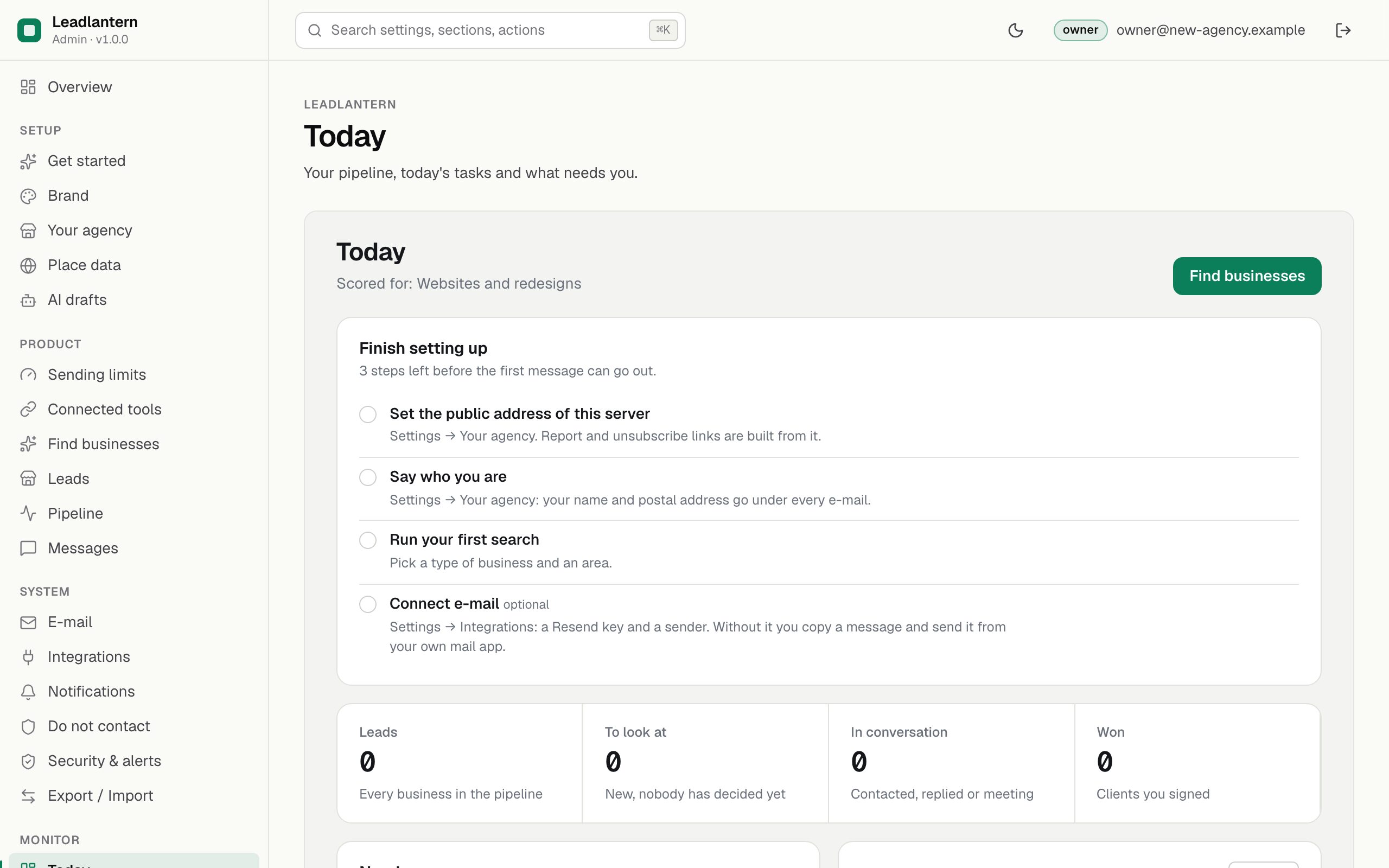
Today is the page to open first each morning. It shows what is left to set up, how many businesses are at each step, the drafts and tasks waiting for you, and the best new leads to look at. Every number comes from your own database; nothing is estimated.
01Finish setting up
Until the required steps are done, a checklist sits at the top:
- Set the public address of this server (Settings → Your agency).
- Say who you are: your name and postal address go under every e-mail.
- Run your first search.
- Connect e-mail (optional): a Resend key and a sender. Without it you copy a message and send it from your own mail app.
02Figures
| Figure | Counts |
|---|---|
| Leads | Every business in the pipeline. |
| To look at | Leads still New: nobody has decided yet. |
| In conversation | Contacted, Replied and Meeting together. |
| Won | Clients you signed. |
The line under the title says which service leads are scored for ("Scored for: Websites and redesigns").
03Needs you
Blocked messages (a send rule stopped them), drafts waiting to be sent, and open tasks, with Overdue on tasks past their date. Each line opens the message or the lead.
04Best new leads
Up to six New leads with the highest score, with type and town. All new opens the full list. The place-data credit ("© OpenStreetMap contributors" or "Powered by Google") is shown under results from those sources.